I Told Two AIs to Build Me a Home Assistant Security Tool, Then Made Them Argue About It
There's a scene from The Big Bang Theory where the whole gang is crammed into Leonard and Sheldon's apartment, buzzing because somebody on the other side of the planet just flipped a lightbulb on and off from their computer. I'll give them the part they were actually excited about: the routing. Watching a signal you fired off make it all the way across the globe to a physical bulb and back, that's genuinely cool, that's the internet doing exactly what it's supposed to do, and there's a real nerd thrill in watching it work.
What always ground my gears about that scene wasn't the tech. It's that they did it on purpose. They took a device, hung it wide open on the internet with nothing guarding it, and then told people about it, like exposure was the achievement instead of the risk. No thought given to who else might come knocking once the door's open. And the scene basically proves the point for me: by the end of it, the whole apartment is flickering on and off on its own, because it wasn't just them anymore, everyone else who'd found that same open device was in there flipping switches too. That's not a punchline, that's exactly what happens when you advertise an open door.
That scene's been rattling around in my head for years, and it finally connected to something a lot closer to home. I run my whole house through Home Assistant. Alarm panel, cameras, the works, deliberately stopping short of smart locks, which I think are a trap dressed up as convenience. Four people have remote access to it, everyone and everything else is local only. And it hit me that I had no real answer to the question that scene never even thought to ask: if someone besides those four ever got in, would I actually know?
Not "would I know eventually." Would I know at all.
I didn't write a single line of the code that answers that question. What I did was describe the problem clearly, stop the AI when it was about to go down a dead end, ask the uncomfortable questions about what could go wrong, and then act as the mediator between two different AIs. Relaying what one found straight to the other and pushing back on both until the answers actually held up. This is the story of that process, not just the tool it produced.
The problem I brought to the table
Home Assistant has no login history. No session list. Nothing in the UI that says "here's everyone who's authenticated into your instance recently, and from what." That part I knew from just living with the software for years, no AI needed. Your own profile page shows your own active sessions, but that's it. Admin or not, you can't see anyone else's.
And this isn't a corner I happened to wander into that nobody else noticed. There's an open GitHub feature request asking for exactly this, a login history/timeline, sitting there since October 2024, still unresolved as of the day I'm writing this. Multiple community threads going back even further ask for the same thing. So this isn't me discovering an obscure edge case, it's a gap other people have been pointing at for years, that just never made it onto anyone's roadmap.
I'll be honest about what actually exists, because I didn't just take one AI's word for it and move on. I had Claude go dig up the current state of things, then separately asked Gemini the same question cold. Both came back with the same answer, which is a small but real reassurance when the whole article hinges on "this gap is real."
Here's what that turned up. Home Assistant logs failed login attempts and throws a notification when one happens, I already knew about this feature firsthand from my own fat fingered password attempts setting off that exact notification more times than I'd like to admit. As of last month Home Assistant has added a real IP ban screen to act on those. That's it. Nothing for a login that actually succeeds. Nothing that shows you a session. No way to tell your own activity apart from anyone else's on the same instance. Admin or not, you can't see anyone else's sessions in the UI. Period.
On a single-user instance that's a shrug. On a household instance with four people able to reach it remotely, where I'm the only one who'd notice anything weird, that's an actual blind spot. I'd already turned on MFA, which protects the front door, but does nothing to tell you if someone's already walked through it.
That was the whole brief I handed Claude: I want to know who's logged into my Home Assistant instance, because right now I have no way to know.
Riffing our way past a dead end
My first instinct was simple: flag any login that isn't coming from Missouri. I live here, I work here, that should cover 99% of legitimate logins.
This is where having an AI to actually push back mattered. Claude went and checked the geolocation idea against how my setup actually works, and came back with two problems before a line of code got written.
First one, I waved off almost immediately. Local connections just show a LAN IP, not geolocatable. Claude flagged it as a dead end. I didn't treat it as one, if someone's already on my LAN, geo-filtering was never going to save me, that's a perimeter breach, a different problem entirely. Not a strike against the idea.
The second one actually killed it: Nabu Casa's cloud relay didn't forward the real client IP at all, confirmed against their own docs at the time. That's the one path a Missouri check would've needed, and it had nothing to work with. Dead end.
And then, almost comically, while I was literally in the middle of writing this article, Nabu Casa shipped a release that touches exactly that.
Update, published the same week as the rest of this piece: Home Assistant 2026.9 shipped September 2, the day I finished this article. Cloud logins used to show as 127.0.0.1, now the real client IP passes through, so IP banning has something to act on.
My first pass said this doesn't reopen geo-blocking, full stop. Wrong threat model, my actual traffic is LAN, VPN, or Nabu Casa, and the first two already clear their own MFA before HA sees them, a Missouri check on top is redundant. That leaves only Cloud traffic, and even there, one thing's unconfirmed: does the fix touch last_used_ip on a successful login, the field this project actually reads, or just the failed-login path the release notes describe. Nobody knows yet, the release is hours old.
So: not dead, not reopened. Maybe real again, for that one slice, if the data holds up. Not worth building on today, and not worth waiting on either, the tool this article is about doesn't care where anything comes from. If the data does check out later, that's a small enrichment, tagging a region on a to-do item, not a rebuild.
The actual pivot: stop asking where a login came from, watch for new logins existing at all. Every session and token has a unique ID. One nobody's approved before means something new happened, regardless of geography.
I wouldn't have gotten there this fast alone. Having something that could go check "does this survive contact with how Nabu Casa actually works" instead of just building my first guess is most of why this moved instead of stalling.
What Claude actually built, and what I made it explain
Here's what we came up with together. A scheduled script reads Home Assistant's internal auth file, compares every session and token against a whitelist, and adds anything new on a to-do list, that list is the approval queue. A text field next to it handles labeling, since "Android app" told me nothing when I had two pending.
First version wasn't the final one, though. Claude initially wanted this running through HA's python_script integration, sandboxed, felt like the safe choice. Then caught itself, the sandbox can't do file I/O, period, confirmed against HA's own docs. Nobody had to catch that but Claude. That's the part of this worth noting, the process catching mistakes even when I wasn't the one doing the catching.
The moment I stopped and asked the hard question
Before putting any of this vibe code on my server, I stopped and asked directly, is there any chance this bricks my setup, followed right behind by, are we creating a security threat by doing this. That question is mine, not something I'd expect an AI to consider since that wasn't something I'd defined in the original request.
The answer surfaced something real. client_name, a field pulled out of a login session, is text the logging-in client itself declares. That's attacker-influenceable, and the first draft of the approval logic was about to pass it into a shell command. That got fixed: attacker-controlled text never touches a shell, only server-generated IDs do, and even those get validated twice before anything runs. The whole thing also runs as a dedicated, non-admin account, so a leaked credential only ever exposes a to-do list, not my house.
None of that hardening happens if I just take the first working draft and ship it. It happens because I treated "does this work" and "could this go wrong" as two separate questions, and made sure both got answered.
Round one: sending it to Gemini
I had Claude write up the full scope, what we were actually trying to achieve, every security decision and the reasoning behind it, plus the complete manual for applying it. I fed that whole thing to Gemini for a second opinion, specifically asking it to find attack vectors Claude and I might have missed or talked ourselves past. The point of this step was getting full review from more than one source before anything went near my infrastructure, not auditing something already running.
It came back clean on the fundamentals, no third-party dependencies, no shell injection in the paths we'd already hardened, but it raised three real gaps: no detection for reuse of an already-approved token, no way to actively block anything, and a dependency on an internal Home Assistant file format that isn't a stable public API.
I took that back to Claude and asked, plainly, which of these can actually be fixed. Two could: dormant-token reactivation detection, so a stolen-but-idle credential suddenly firing again gets flagged even without a new ID, and a loud failure mode if that internal file format ever changes shape, instead of a silent one. One of them couldn't. Real cross-user session revocation needs access Home Assistant's own API which doesn't expose to anyone but the token holder themselves. I decided that one stays out of scope on purpose, not because it slipped through.
Round two: making them argue
After Claude's second pass, the one that incorporated fixes from Gemini's first notes. I went through the process of wiring everything up. Did a test. Then I had it write up another document of what got fixed, what's staying out of scope on purpose (the cross-user revocation piece, HA's API only lets a token holder revoke their own session), and why.
That package went back to Gemini as a straight fact-check. This is the part I actually want people to see, it's the difference between "an AI built something" and "I know this thing is solid." Five findings came back, one flagged critical.
From there it was a slow back-and-forth, not one round trip. I took Gemini's counterpoints verbatim to Claude and asked for a rebuttal, defend it or concede it, show your work.
Two were genuinely wrong. The "critical" one claimed a Home Assistant automation couldn't reference one variable from another in the same block. Claude's counter was evidence, not argument: a trace screenshot from my own running system showing that exact pattern working in production. Already happened, not theoretical. The second, a race condition reading HA's storage file, got checked against how that storage actually works, atomic writes via temp-file-and-replace, built specifically to prevent the failure mode Gemini described.
Three held up. One was real: the script was rewriting its whole state file every scan for every active session, real wear on SD-card installs, even if "continuous" overstated it. One was a genuine edge case: a freshly-created text helper can report the literal state "unknown" instead of empty, which would've permanently mislabeled a session. One was free, harmless hardening, so it went in regardless.
Four rounds of adversarial review on a project that started as "wait, how would I even know." Me on the first idea, Claude and me on the build, Gemini on the finished architecture, then Claude and Gemini going back and forth on code review, while I held veto power and my own running system as tiebreaker.
How to build this yourself
Everything below is the final, post-review, post-argument version. Not a HACS package, not something I'm going to maintain forever. Four pieces glued together with Home Assistant automations, all running natively, no third-party hosting.
1. Create a dedicated, non-admin user
Settings > People > Users > Add User. Name it something like service-session-watch, leave it non-admin. Log in as that user once, go to its profile, Security tab, Long-Lived Access Tokens, create one. Copy it now, you won't see it again.
While you're in that user's settings, flip on "Can only log in from the local network" too. It won't protect the token file itself if that ever leaks, but it does close off a different path, someone guessing the account's password and logging in remotely.
2. Set up the scripts folder
bash
mkdir -p /config/scripts
echo -n "your-long-lived-token-here" > /config/scripts/.ha_token
chmod 600 /config/scripts/.ha_token
If your config lives in git, get .ha_token and known_sessions.json into .gitignore before you do anything else.
3. The scan script
Save as /config/scripts/check_new_sessions.py:
python
#!/usr/bin/env python3
"""
======================================================================
 SESSION WATCH — SCANNER SCRIPT
======================================================================
Plain-English summary: this script's whole job is to look at Home
Assistant's internal "who's logged in" file, compare it against a
list of logins we already know about, and put anything new on a
to-do list so a person can review it.

It runs on a timer (every 5-10 minutes, set up separately as a Home
Assistant automation) — it is not a program that stays running, it
runs once, does its checks, and exits.

Two separate things get checked each run:
  1. Brand new logins/tokens that have never been seen before.
  2. Logins that WERE already approved, but had been sitting unused
     for a long stretch and just got used again (a "reactivation" —
     see the big comment further down for why this matters).

It also has a built-in safety check: if Home Assistant's internal
file format ever changes shape (which could happen in a future
update, since this isn't an officially documented file), the script
notices and sends a loud warning instead of just quietly finding
nothing and giving a false sense of security.
======================================================================
"""

import json
import os
import urllib.request
from datetime import datetime, timezone, timedelta

# ----------------------------------------------------------------
# SETTINGS — the file paths and web address this script needs.
# If you move any of these files, update the paths here to match.
# ----------------------------------------------------------------

CONFIG_DIR = "/config"

# This is Home Assistant's own internal record of every login and
# access token. We only ever READ this file, never write to it.
AUTH_STORE = os.path.join(CONFIG_DIR, ".storage", "auth")

# This is OUR file — the list of logins we've already approved,
# already asked about, or are watching for reactivation.
STATE_FILE = os.path.join(CONFIG_DIR, "known_sessions.json")

# This is the secret key (Long-Lived Access Token) this script uses
# to talk to Home Assistant's API and create to-do items.
TOKEN_FILE = os.path.join(CONFIG_DIR, "scripts", ".ha_token")

# The name of the to-do list where new/unrecognized logins get added
# for you to review. Update this if your list's real name is
# different (check Developer Tools > States in Home Assistant).
TODO_LIST_ENTITY = "todo.ha_login_approvals"

# Where to send API requests. 127.0.0.1 means "this same computer" —
# using the plain number instead of the word "localhost" avoids a
# rare networking hiccup on some setups.
HA_URL = "http://127.0.0.1:8123"

# How many days a login can sit completely unused before using it
# again counts as a "reactivation" worth flagging. Raise this number
# if you travel a lot and don't want short gaps to trigger alerts;
# lower it if you want to be told about shorter idle periods.
DORMANT_THRESHOLD_DAYS = 14

# How often (at minimum) we're willing to save a small housekeeping
# update to disk for a login that's being used completely normally.
# This exists purely to reduce disk writes — see the comment further
# down near where this is used for the full explanation.
WRITE_THROTTLE_HOURS = 1


# ----------------------------------------------------------------
# HELPER FUNCTIONS — small reusable pieces the rest of the script
# calls on. You shouldn't need to change anything in this section.
# ----------------------------------------------------------------

def load_json(path, default):
    """
    Reads a JSON file (a common format for storing structured data
    as text) and returns its contents as a Python dictionary/list.
    If the file doesn't exist yet, or is broken/unreadable for any
    reason, this returns `default` instead of crashing the script.
    """
    if not os.path.exists(path):
        return default
    try:
        with open(path, "r") as f:
            return json.load(f)
    except (json.JSONDecodeError, OSError):
        return default


def save_json(path, data):
    """Writes a Python dictionary/list out to a file as JSON text."""
    with open(path, "w") as f:
        json.dump(data, f, indent=2)


def call_service(domain, service, data, token):
    """
    Asks Home Assistant to do something (a "service call"), the same
    kind of action a button press or an automation would trigger.
    `domain` and `service` together identify the action (for example
    domain="todo", service="add_item" means "add an item to a to-do
    list"). `data` is the details of what to do. `token` proves we're
    allowed to ask.
    """
    url = f"{HA_URL}/api/services/{domain}/{service}"
    req = urllib.request.Request(
        url,
        data=json.dumps(data).encode("utf-8"),
        headers={
            "Authorization": f"Bearer {token}",
            "Content-Type": "application/json",
        },
        method="POST",
    )
    with urllib.request.urlopen(req, timeout=10) as resp:
        return resp.read()


def parse_ts(value):
    """
    Converts a timestamp text string (like "2026-01-15T10:23:45+00:00")
    into a proper Python datetime object we can do math on (like
    "how many days between these two times?"). Returns None if the
    text is missing or doesn't look like a valid timestamp.
    """
    if not value:
        return None
    try:
        return datetime.fromisoformat(value.replace("Z", "+00:00"))
    except (ValueError, AttributeError):
        return None


def add_todo_item(summary, description, token):
    """
    Adds one item to the review to-do list. `summary` is the title
    line you'll see in the list; `description` is the extra detail
    shown underneath it.
    """
    call_service(
        "todo",
        "add_item",
        {
            "entity_id": TODO_LIST_ENTITY,
            "item": summary,
            "description": description,
        },
        token,
    )


# ----------------------------------------------------------------
# MAIN LOGIC — this is what actually runs each time the script fires.
# ----------------------------------------------------------------

def main():
    # Step 1: read our own secret key, so we're allowed to talk to
    # Home Assistant's API.
    with open(TOKEN_FILE, "r") as f:
        token = f.read().strip()

    # Step 2: read Home Assistant's internal login record.
    auth_data = load_json(AUTH_STORE, {})

    # Step 3: SAFETY CHECK. Before trusting anything we just read,
    # make sure it actually looks like the structure we expect
    # (a "users" list and a "refresh_tokens" list). If a future
    # Home Assistant update changes this internal format, this check
    # catches it and sends a clear warning instead of the script
    # just silently finding "nothing new" forever, which would look
    # identical to everything being fine when it isn't.
    data_section = auth_data.get("data")
    if (
        not isinstance(data_section, dict)
        or not isinstance(data_section.get("users"), list)
        or not isinstance(data_section.get("refresh_tokens"), list)
    ):
        call_service(
            "persistent_notification",
            "create",
            {
                "title": "Session Watch: auth store shape changed",
                "message": (
                    "check_new_sessions.py could not find the expected "
                    "'users'/'refresh_tokens' structure in .storage/auth. "
                    "This likely means a Home Assistant update changed the "
                    "internal format. The scan is stopping rather than "
                    "silently reporting nothing, go check the script."
                ),
                "notification_id": "session_watch_schema_error",
            },
            token,
        )
        return  # Stop here — don't try to scan data we don't trust.

    # Step 4: load our own memory of what we've already dealt with.
    #   "approved"  = logins a person has reviewed and said "yes, that's
    #                 fine" for. A dictionary keyed by the login's ID.
    #   "flagged"   = logins we've already put on the to-do list once,
    #                 so we don't add duplicate entries every scan.
    #   "reactivation_pending" = approved logins currently sitting on
    #                 the to-do list because they woke up after being
    #                 idle a long time, waiting on a decision.
    state = load_json(
        STATE_FILE, {"approved": {}, "flagged": [], "reactivation_pending": []}
    )
    approved = state.get("approved", {})
    flagged = set(state.get("flagged", []))
    reactivation_pending = set(state.get("reactivation_pending", []))

    # Build a quick lookup so we can turn a user's internal ID into
    # their actual display name.
    users = data_section.get("users", [])
    user_names = {u["id"]: u.get("name", "unknown") for u in users}

    # Every login and every long-lived access token Home Assistant
    # currently knows about.
    refresh_tokens = data_section.get("refresh_tokens", [])

    new_flags = []
    new_reactivations = []
    state_changed = False  # tracks whether we need to save anything

    # Step 5: go through every login/token one at a time.
    for rt in refresh_tokens:
        token_id = rt.get("id")
        if not token_id:
            continue  # skip anything malformed with no ID at all

        # Skip Home Assistant's own internal system tokens (used by
        # things like the Supervisor) — these aren't real user logins
        # and aren't worth showing you.
        if rt.get("token_type") == "system":
            continue

        # --- CASE 1: a login/token we've genuinely never seen before ---
        if token_id not in approved and token_id not in flagged:
            client_name = rt.get("client_name") or rt.get("client_id") or "unknown client"
            user_id = rt.get("user_id")
            username = user_names.get(user_id, "unknown user")
            created_at = rt.get("created_at", "unknown time")

            # The token_id is tacked onto the end so the approval
            # script can pull it back out later once someone checks
            # the box.
            summary = f"{username} | {client_name} | {token_id}"
            add_todo_item(summary, f"First seen: {created_at}", token)
            new_flags.append(token_id)
            continue

        # --- CASE 2: an already-approved login — check whether it went
        # quiet for a long stretch and just started being used again.
        # This matters because it's a different warning sign than a
        # brand new login: it can mean a credential that leaked a
        # while ago just got picked up and used by someone else.
        if token_id in approved and token_id not in reactivation_pending:
            entry = approved[token_id]
            baseline = parse_ts(entry.get("last_seen_used_at"))
            current = parse_ts(rt.get("last_used_at"))

            if baseline and current and current > baseline:
                gap_days = (current - baseline).days

                if gap_days >= DORMANT_THRESHOLD_DAYS:
                    # It really was idle a long time, then got used
                    # again — flag it for review, same as a new login.
                    label = entry.get("label") or "unlabeled"
                    summary = f"REACTIVATED after {gap_days}d idle | {label} | {token_id}"
                    add_todo_item(
                        summary,
                        f"Was idle since {entry.get('last_seen_used_at')}, "
                        f"used again at {rt.get('last_used_at')}",
                        token,
                    )
                    new_reactivations.append(token_id)

                elif (current - baseline) >= timedelta(hours=WRITE_THROTTLE_HOURS):
                    # It's just being used normally — nothing to flag.
                    # But we do want to update our "last seen" note so
                    # the gap doesn't keep growing forever. We only
                    # bother saving this update once an hour, though,
                    # rather than every single scan — an actively-used
                    # login might get scanned every 5-10 minutes, and
                    # rewriting the whole file that often is
                    # unnecessary wear on the storage, especially on
                    # SD-card-based setups. One hour of "staleness"
                    # here is irrelevant next to a 14-day threshold.
                    entry["last_seen_used_at"] = rt.get("last_used_at")
                    state_changed = True
                # else: used again, but too recently since our last
                # save to bother writing yet — do nothing this round.

            elif current and not baseline:
                # First time we're able to record a "last used" time
                # for this login at all.
                entry["last_seen_used_at"] = rt.get("last_used_at")
                state_changed = True

    # Step 6: save anything that changed back to our memory file.
    if new_flags:
        state["flagged"] = list(flagged | set(new_flags))
        state_changed = True

    if new_reactivations:
        state["reactivation_pending"] = list(reactivation_pending | set(new_reactivations))
        state_changed = True

    if state_changed:
        state["approved"] = approved
        save_json(STATE_FILE, state)


if __name__ == "__main__":
    main()
4. The approval script
Save as /config/scripts/approve_session.py:
python
#!/usr/bin/env python3
"""
======================================================================
 SESSION WATCH — APPROVAL SCRIPT
======================================================================
Plain-English summary: this script runs the moment you check a box
on the review to-do list. Its job is to record "yes, this login is
fine" permanently, so the scanner script stops asking about it.

It does three things, in order:
  1. Double-checks that the ID it was given actually looks like a
     real, safe ID (not just trusting it blindly).
  2. Grabs whatever name you typed into the little text box next to
     the to-do list (e.g. "Drew's Laptop"), if anything.
  3. Saves all of that into our permanent memory file, and clears
     the text box out so it's ready for the next approval.

IMPORTANT SAFETY NOTE FOR ANYONE MODIFYING THIS SCRIPT:
This script is only ever given one small, safe piece of information
on the command line: a "token_id", which is a random ID that Home
Assistant itself generated — never text that came from the login
attempt itself (like a device or browser name), and never the free
text someone typed into the label box. Both of those are kept
completely separate and are only ever sent over as structured data
(JSON), never as a command someone could sneak instructions into.
If you're extending this script, keep that separation — never make
the parts that could contain "someone else's text" become part of a
command that gets run on the computer.
======================================================================
"""

import json
import os
import re
import sys
import urllib.request
from datetime import datetime, timezone

# ----------------------------------------------------------------
# SETTINGS — same idea as in the scanner script. Update these paths
# if any of the underlying files/helpers get renamed or moved.
# ----------------------------------------------------------------

CONFIG_DIR = "/config"
AUTH_STORE = os.path.join(CONFIG_DIR, ".storage", "auth")
STATE_FILE = os.path.join(CONFIG_DIR, "known_sessions.json")
TOKEN_FILE = os.path.join(CONFIG_DIR, "scripts", ".ha_token")

# The little text-box helper you type a friendly name into before
# checking a box (e.g. "Drew's Laptop").
LABEL_ENTITY = "input_text.session_label"

HA_URL = "http://127.0.0.1:8123"

# What a real, safe token ID is allowed to look like: only letters,
# numbers, dashes, and underscores, between 8 and 64 characters long.
# Anything that doesn't match this gets rejected outright — this is
# the safety check mentioned in the big comment up top.
TOKEN_ID_PATTERN = re.compile(r"^[A-Za-z0-9_-]{8,64}$")

# A label longer than this gets cut off — it's a short name tag,
# not a paragraph.
MAX_LABEL_LENGTH = 100


# ----------------------------------------------------------------
# HELPER FUNCTIONS
# ----------------------------------------------------------------

def load_json(path, default):
    """Reads a JSON file safely, returning `default` if it's missing
    or unreadable rather than crashing the script."""
    if not os.path.exists(path):
        return default
    try:
        with open(path, "r") as f:
            return json.load(f)
    except (json.JSONDecodeError, OSError):
        return default


def save_json(path, data):
    """Writes a Python dictionary/list out to a file as JSON text."""
    with open(path, "w") as f:
        json.dump(data, f, indent=2)


def get_state(entity_id, token):
    """
    Asks Home Assistant "what is this entity currently set to?" —
    used here to read whatever text is currently sitting in the
    label helper box. This is a plain data request (GET), not a
    command, so there's no way for whatever comes back to run
    anything on the computer.
    """
    url = f"{HA_URL}/api/states/{entity_id}"
    req = urllib.request.Request(
        url,
        headers={"Authorization": f"Bearer {token}"},
        method="GET",
    )
    with urllib.request.urlopen(req, timeout=10) as resp:
        return json.loads(resp.read())


def call_service(domain, service, data, token):
    """Asks Home Assistant to perform an action — same helper as in
    the scanner script."""
    url = f"{HA_URL}/api/services/{domain}/{service}"
    req = urllib.request.Request(
        url,
        data=json.dumps(data).encode("utf-8"),
        headers={
            "Authorization": f"Bearer {token}",
            "Content-Type": "application/json",
        },
        method="POST",
    )
    with urllib.request.urlopen(req, timeout=10) as resp:
        return resp.read()


def find_last_used_at(token_id):
    """
    Looks up, in Home Assistant's own login record, when this
    particular login was last actually used — so we have an
    up-to-date starting point for the "has this gone idle?" check
    the scanner script does later.
    """
    auth_data = load_json(AUTH_STORE, {})
    for rt in auth_data.get("data", {}).get("refresh_tokens", []):
        if rt.get("id") == token_id:
            return rt.get("last_used_at")
    return None


# ----------------------------------------------------------------
# MAIN LOGIC — runs once, each time the approval automation fires.
# ----------------------------------------------------------------

def main():
    # Step 1: make sure we were actually given something to work with.
    if len(sys.argv) < 2:
        print("Usage: approve_session.py '<token_id>'", file=sys.stderr)
        sys.exit(1)

    token_id = sys.argv[1].strip()

    # Step 2: SAFETY CHECK — refuse to continue unless this really
    # looks like a genuine token ID. This protects against a bug
    # anywhere upstream (in the automation that called this script)
    # accidentally passing through something it shouldn't have.
    if not TOKEN_ID_PATTERN.match(token_id):
        print(f"Refused: '{token_id}' does not look like a valid token id.", file=sys.stderr)
        sys.exit(1)

    # Step 3: read our own secret key so we're allowed to talk to
    # Home Assistant's API.
    with open(TOKEN_FILE, "r") as f:
        api_token = f.read().strip()

    # Step 4: grab whatever name was typed into the label box, if
    # anything. A text helper that's brand new or was just cleared
    # can report back the literal word "unknown" instead of actually
    # being empty — we treat that the same as "nothing typed", so a
    # session doesn't end up permanently labeled "unknown".
    new_label = ""
    try:
        label_state = get_state(LABEL_ENTITY, api_token)
        raw_label = (label_state.get("state") or "").strip()
        if raw_label.lower() in ("unknown", "unavailable", "none"):
            raw_label = ""
        new_label = raw_label[:MAX_LABEL_LENGTH]
    except Exception as exc:
        # If fetching the label fails for any reason, don't let that
        # stop the actual approval — just proceed without one.
        print(f"Warning: could not fetch label ({exc}); continuing without one.", file=sys.stderr)

    # Step 5: load our memory file, and update the entry for this
    # login. If it already had a label from before (e.g. this is a
    # reactivation being re-approved) and nothing new was typed this
    # time, keep the old label instead of erasing it.
    state = load_json(
        STATE_FILE, {"approved": {}, "flagged": [], "reactivation_pending": []}
    )
    approved = state.get("approved", {})
    reactivation_pending = set(state.get("reactivation_pending", []))

    existing = approved.get(token_id, {})
    label = new_label or existing.get("label", "")

    approved[token_id] = {
        "label": label,
        "approved_at": existing.get("approved_at") or datetime.now(timezone.utc).isoformat(),
        # Re-check the real, current "last used" time from Home
        # Assistant's own record, so this resets cleanly even if
        # this approval is for a reactivation, not a first-time one.
        "last_seen_used_at": find_last_used_at(token_id),
    }
    state["approved"] = approved

    # If this login had been sitting on the to-do list as a flagged
    # reactivation, take it out of that "waiting" list now that it's
    # been dealt with.
    if token_id in reactivation_pending:
        reactivation_pending.discard(token_id)
        state["reactivation_pending"] = list(reactivation_pending)

    save_json(STATE_FILE, state)

    # Step 6: clear the label box out, so the next approval starts
    # fresh instead of accidentally reusing this name.
    try:
        call_service(
            "input_text",
            "set_value",
            {"entity_id": LABEL_ENTITY, "value": ""},
            api_token,
        )
    except Exception as exc:
        print(f"Warning: could not clear label field ({exc}).", file=sys.stderr)

    if label:
        print(f"Approved session {token_id} as '{label}'")
    else:
        print(f"Approved session {token_id}")


if __name__ == "__main__":
    main()
5. The whitelist file
bash
echo '{"approved": {}, "flagged": [], "reactivation_pending": []}' > /config/known_sessions.json6. Register the shell commands
In configuration.yaml:
yaml
shell_command:
  check_new_sessions: "python3 /config/scripts/check_new_sessions.py"
  approve_session: "python3 /config/scripts/approve_session.py '{{ token_id }}'"
Run Developer Tools > YAML > Check Configuration before you restart.
7. A Local To-do list, and a text helper
Settings > Devices & Services > Add Integration, search "Local To-do," name it HA Login Approvals. Confirm its entity ID in Developer Tools > States and update TODO_LIST_ENTITY in the scan script if it's not todo.ha_login_approvals.
Then Settings > Devices & Services > Helpers > Create Helper > Text, named so it comes out as input_text.session_label. This is the field you'll type "Drew's Laptop" or whatever into before you check a box.
Add both to a dashboard using an Entities card specifically, not the default auto-generated view. The default view renders a text helper as a tappable tile that opens a popup, not an inline field you can actually type into. An Entities card gives you the real inline text box.
8. Three automations
Scan. Time pattern trigger, every 5 to 10 minutes, calls shell_command.check_new_sessions.
Approve. This is the one with actual logic, and worth knowing before you build it: the native todo.item_completed trigger only gives you which item changed, not its text. You need a follow-up todo.get_items call to fetch that. Build it in YAML mode:
yaml
alias: "Session Watch — Approve"
triggers:
  - trigger: todo.item_completed
    target:
      entity_id: todo.ha_login_approvals
conditions: []
actions:
  - action: todo.get_items
    target:
      entity_id: todo.ha_login_approvals
    data:
      status: completed
    response_variable: completed_items
  - variables:
      matched_item: >-
        {{ completed_items['todo.ha_login_approvals']['items']
           | selectattr('uid', 'in', trigger.item_ids)
           | first }}
      extracted_token_id: >-
        {{ matched_item.summary.split('|')[-1].strip() }}
  - if:
      - condition: template
        value_template: >-
          {{ extracted_token_id | regex_match('^[A-Za-z0-9_-]{8,64}$') }}
    then:
      - action: shell_command.approve_session
        data:
          token_id: "{{ extracted_token_id }}"
      - action: todo.remove_item
        target:
          entity_id: todo.ha_login_approvals
        data:
          item: "{{ matched_item.uid }}"
    else:
      - action: persistent_notification.create
        data:
          title: "Session Watch: bad token_id extraction"
          message: >-
            Could not extract a valid token_id from completed item:
            {{ matched_item.summary if matched_item else 'unknown item' }}
mode: single
One thing to actually verify rather than trust blind: after saving, check a test item, open the automation's Trace, and step through it to confirm matched_item resolved correctly. I hit a real bug doing exactly this, .items on a dictionary collides with Python's built-in dict.items() method, so Jinja grabs the wrong thing entirely. The fix is bracket notation, ['items'] instead of .items. That trace, incidentally, is the same one that ended up settling an argument between two AIs weeks later. Worth building the habit of actually looking at your traces, not just trusting that green checkmark.
Alert. Same pattern, different trigger:
yaml
alias: "Session Watch — Alert"
triggers:
  - trigger: todo.item_added
    target:
      entity_id: todo.ha_login_approvals
conditions: []
actions:
  - action: todo.get_items
    target:
      entity_id: todo.ha_login_approvals
    data:
      status: needs_action
    response_variable: pending_items
  - variables:
      matched_item: >-
        {{ pending_items['todo.ha_login_approvals']['items']
           | selectattr('uid', 'in', trigger.item_ids)
           | first }}
  - action: notify.mobile_app_YOUR_DEVICE
    data:
      message: "{{ matched_item.summary if matched_item else 'Check the to-do list' }}"
      data:
        priority: high
        ttl: 0
        channel: Security
        importance: high
mode: queued
Find your real notify service under Developer Tools > Actions, search notify.mobile_app. The priority/ttl/channel flags matter more here than on a lot of other alerts I run, since Android will happily sit on a normal-priority push for a while thanks to Doze and FCM batching, and a session alert that shows up twenty minutes late has lost most of its point.
9. Test it, all the way through
Log in from a browser you haven't used before. Confirm the push notification arrives. Confirm the to-do item shows up with the right details. Type a label, check the box, confirm the whitelist file updated and the item disappeared. Expect the service account's own token to flag itself on the very first scan, that's correct behavior, approve it like anything else.
Final verdict
I want to be clear. I did not write this code. This is a fully vibe coded project. What I did was take a real problem to an AI and work with it, not hand over a request and accept whatever came back. I let it build the framework, then made it scrutinize its own work afterward: killed a bad idea early by making Claude check it against how my setup actually works, asked the security questions that mattered before trusting it with real credentials, caught a live bug in production by actually reading a trace instead of trusting a green checkmark, then sent the finished thing through a second AI for review, twice, and made both defend their claims against each other with evidence instead of picking whichever answer sounded more confident.
That's not a knock on knowing Python, plenty of people should still learn it. What this actually demonstrates is different, Knowing enough to be dangerous, plus a big-picture mindset. Not "I have a problem, code fixes problem" like a caveman. Actually looking at what comes out the other end and asking, okay, this fixes the problem, but what else needs considering, performance, security, all of it. That's the part that mattered when handing an AI-built system real access to my house. The code is good because the process around it was adversarial at every step, not because either AI got it right on the first try.
It won't catch someone actively riding a session that's already logged in. It can't block anything on its own, only tell me fast enough that I can delete the user that owns the session if needed. This all also depends on a file format Home Assistant could change in an update tomorrow, this isn't a hypothetical, a release shipped the same week I finished writing this that touched adjacent territory. I know all three of those going in, and I know them because I asked, not because I got lucky.
For a Tuesday-night project that started because I got mildly paranoid about IP addresses that turned out to be my own work laptop and VPN, I'll take it.
How it looks in prod:
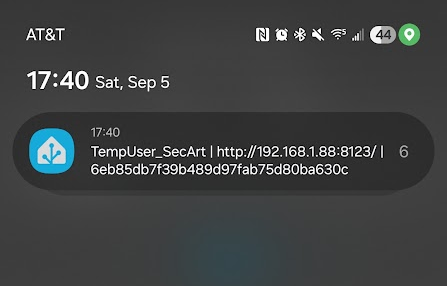
Reactivation came from when I turned on my desktop to write this article and signed into home assistant there. Which I haven't done since summer started. Followed by the test account I created to sign in from an incognito window to demonstrate how it works.
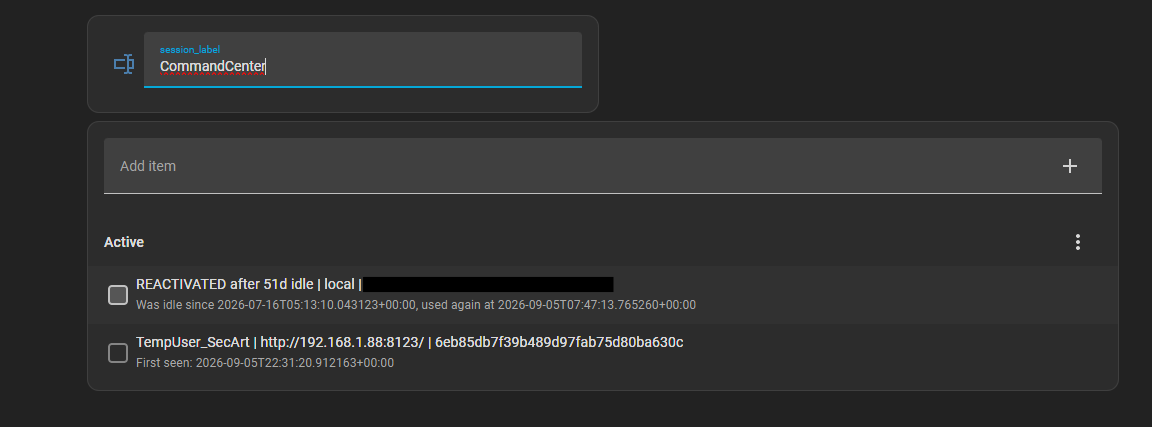
Checking the box adds it to the known_sessions file with the name I provided and removes it from the todo list.

Notifications captured from my smart watch from :
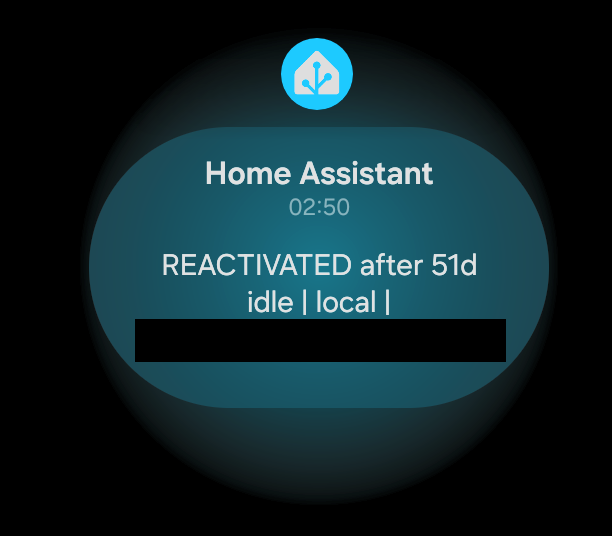
From my phone for the test account(which is already deleted before publishing this article):