I Asked ChatGPT How to Use ChatGPT Better. It Worked

I hate studying endless documents for the sake of studying. When it's just reading with no hands-on work, I can only go for so long before my brain checks out. Give me a problem to solve or something to build, and I'll stay engaged for hours. Pure documentation? I'm done in 20 minutes.
So when I started studying for the Datadog Fundamentals exam, I hit a wall fast. It's an insane amount of information. I love technology and I love learning about it, don't get me wrong. Datadog's courses were great and free. But they say right on the training that it doesn't cover everything on the exam. The rest? Endless documents full of hundreds, maybe thousands of integrations and configurations.
It wasn't working for me.
So I leaned into AI. I've been doing this for a while now, getting out of technical documentation hell and nailing down the high points. But this time I wanted something better than just asking random questions with no structure. I wanted a comprehensive study guide I could actually work through systematically.
I gave the same prompt to Claude, ChatGPT, Grok, and Gemini to see what I'd get.
The results were all over the place. One gave me exactly what I needed - detailed, practical, ready to use. The other three gave me generic overviews that barely scratched the surface. Same prompt, wildly different outputs.
At first I thought it was just about picking the "best" AI. Turns out the real problem was me. I was prompting AI like I use Google, and that doesn't work.
The Experiment
I needed a comprehensive study guide for the Datadog Fundamentals certification. I had the official exam guide PDF and wanted something I could study from and print out. Simple enough, right?
I crafted what I thought was a clear prompt:
"I'm studying for the Datadog Fundamentals certification exam. Please use Datadog's current documentation to create a study guide for this certification exam. I've added the exam guide to set the standards of what's on the exam."
I sent this identical prompt to Claude, ChatGPT, Grok, and Gemini. Same input, four different AIs. Let's see what happens.
What I Got Back
Claude gave me a comprehensive, deeply detailed study guide immediately. It had concrete examples, command syntax, configuration file paths, port numbers - everything I'd need to both pass the exam and actually use Datadog. It covered all exam domains with operational depth.
ChatGPT initially gave me something much shorter and more conceptual. It felt like it had put a "narrow funnel" on the results, giving me the absolute minimum interpretation of what I asked for. Topics were covered, but at a surface level without the practical details I needed.
Grok provided a decent conceptual outline covering the exam domains, but stayed high-level. Good for understanding what topics existed, less useful for actually studying them.
Gemini gave me content similar to ChatGPT's initial attempt. It was conceptually complete but operationally shallow.
So I had: one AI that gave me exactly what I needed, and three that gave me the bare minimum interpretation of "study guide."
What the hell was going on?
The Inverse Funnel Problem
Here's what Google taught us that breaks when we use AI:
With Google, you start broad and filter down. You search for "study guide," get ten million results, then add terms like "Datadog" and "certification" until you narrow it to what you actually want. It's a funnel: wide at the top, narrow at the bottom.
AI works the opposite way. If you start broad, you get generic output. The AI makes assumptions about what you want and defaults to the most common interpretation. Not the most useful one. To get specific results, you need to start specific.
I asked for a "comprehensive study guide." To me, that meant:
- Documentation-style depth
- Concrete examples and commands
- Tables and code blocks
- Structured for both studying and reference
- In a downloadable format
But I didn't say any of that. I assumed "comprehensive" would communicate it.
ChatGPT interpreted "comprehensive" as "covers all topics at a conceptual level."
Claude interpreted it as "thorough and detailed with practical examples."
Grok and Gemini landed somewhere in between.
None of them were wrong. They were just literal. I gave them ambiguous instructions and got ambiguous results.
This is the inverse funnel problem: AI requires specificity up front that Google never taught us to provide.
The Meta-Prompting Breakthrough
Frustrated with ChatGPT's initial output, I used a technique I've developed over time: I asked ChatGPT why it didn't give me what I wanted.
"What could I have done differently when asking you for a study guide to get something more like this [Claude's output]?"
This is something I do regularly when an AI misses the mark. Instead of just rephrasing and hoping for better results, I ask: "I expected X but you gave me Z. Why?"
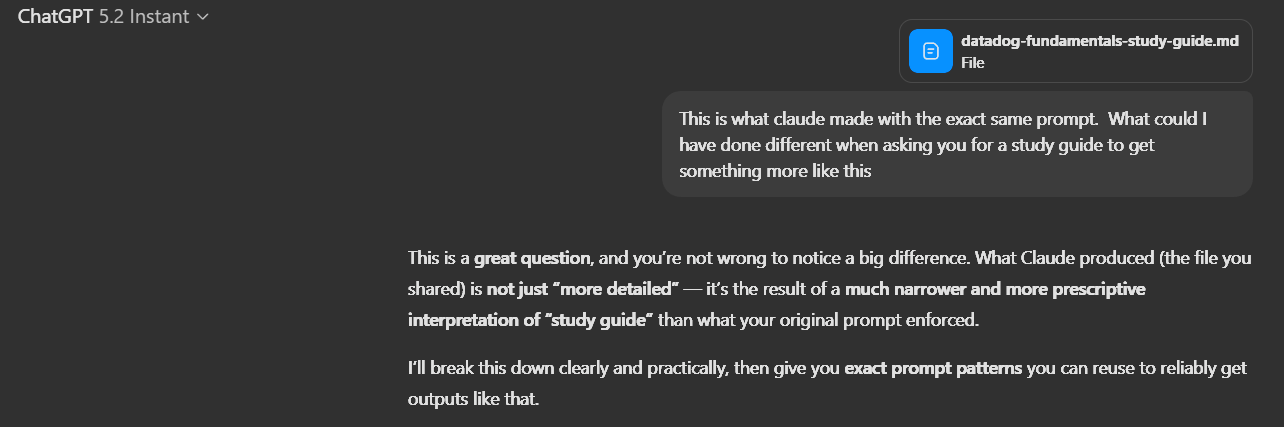
ChatGPT's response was eye-opening. It told me exactly what it needed:
"Instead of 'Create a comprehensive study guide,' you needed something closer to: 'Create a documentation-style, exam-aligned reference guide with concrete commands, examples, defaults, and syntax.'"
It went on to explain that I needed to define the output shape, not just the content:
- Documentation-style, not conceptual
- Deeply detailed and operational
- Include concrete examples, commands, file paths, ports, defaults, and syntax
- Written as a single self-contained reference document
- More detailed than strictly required for the exam, but still exam-aligned
Then it gave me the exact prompt that would have worked:
"Create a comprehensive Datadog Fundamentals Certification study guide that is:Documentation-style, not conceptualDeeply detailed and operationalIncludes concrete examples, commands, file paths, ports, defaults, and syntaxWritten as a single self-contained reference documentMore detailed than strictly required for the exam, but still exam-alignedUses Datadog's current documentationDoes NOT avoid specificity for fear of 'over-teaching'"
I opened a temporary chat (so ChatGPT wouldn't have access to our conversation history) and tried this new prompt. The result was dramatically better - detailed, operational, structured exactly how I wanted it.
Most people don't think to ask an AI why it interpreted their request a certain way. They just get frustrated and give up, or keep rephrasing until something works. But asking "why did you do that?" has become one of my most effective tools for getting better outputs.
The Capability Gap
Here's where things get messier: even with better prompting, different AIs have different defaults for depth and detail.
I tested my improved prompt on all four AIs. The results:
Claude included specific commands, file paths, port numbers, configuration examples - operational details that assume you'll actually use this information.
ChatGPT (with the better prompt) got close to that level, giving me tables, examples, and concrete details. The improved prompt worked.
Grok and Gemini still stayed more conceptual even with the improved prompt. They'd tell you what Datadog does, but were less likely to show you exactly how to configure it.
Some AIs are tuned to go deep by default. Others stay surface-level unless you're extremely explicit. This means you can have a perfect prompt and still get different depths depending on which AI processes it.
The File Creation Annoyance
As a side note: getting your content into a usable format also varied. Claude and ChatGPT both created downloadable files directly - ChatGPT just shows you the Python code it's running internally, which is interesting if you care about that sort of thing. Grok said it couldn't create files at all. Gemini gave me a broken download link that searched for a non-existent file.
This isn't a dealbreaker, copy & paste works, but it adds friction to the workflow. When you're iterating on prompts and testing outputs, seamless file creation is nice to have.
But Here's the Thing
This experiment makes it sound like Claude "won" and Grok "lost." That's not the point.
For this specific task, creating a detailed operational study guide, Claude delivered exactly the depth and structure I needed.
But Grok has been invaluable for a completely different use case: voice-based studying.
I can pull up Grok's voice mode and have it quiz me on concepts while I'm doing low brain power tasks like folding laundry or cleaning. Here's the workflow: I'll feed it the study guide Claude created, or a practice test from ChatGPT, along with instructions:
"Ask me each question one at a time. If I miss one, let's go over the concept, then move to the next question once I can explain it back to you."
It's conversational, natural, and doesn't require me to sit at a computer. It's like having a study partner in college again, without burdening family and friends with material they have no interest in. The study guide I got from Claude pairs perfectly with Grok's voice mode - one AI creates the material, another helps me memorize it.
ChatGPT has voice too, but Grok's implementation feels more natural to me for this specific workflow.
So which AI is "better"? Depends entirely on what you're trying to do.
We're still in the early stages of AI where each tool has evolved different strengths. Claude excels at generating deeply detailed, operational documentation. Grok is my go-to for conversational voice interaction while multitasking. ChatGPT responds exceptionally well to meta-prompting and iterative refinement. Gemini's image generation is outstanding - every image in my articles that isn't a screenshot has come from Gemini.
Important caveat: This is my experience with my specific workflows. I don't test these AIs daily, and your mileage will absolutely vary. Gemini might be incredible at things I haven't tried. ChatGPT might struggle with tasks it handles brilliantly for you. This isn't a definitive ranking - it's a snapshot of what worked (and didn't work) for me during this particular experiment.
What This Means for You
If you walk away from this article with anything, make it these three things:
1. Specify the output shape, not just the content
Don't say: "Create a comprehensive study guide"
Say: "Create a documentation-style reference guide with concrete examples, commands, tables, and code blocks, formatted as a single downloadable document"
The more specific you are about how you want the information presented, the better your results will be.
2. Use meta-prompting when you're stuck
If an AI gives you something that misses the mark, don't just rephrase and try again. Ask it:
"How should I have asked that question to get the output I wanted?"
"What prompt would have given me a more detailed/structured/technical response?"
This is weirdly effective. The AI will often tell you exactly what it needs to hear.
3. Don't give up after one AI
If Claude can't do something, try ChatGPT. If ChatGPT's approach doesn't work for you, try Grok or Gemini. Each tool has different capabilities and different interpretations of the same prompt.
Some tasks require switching tools mid-workflow. That's not a bug - it's the current state of AI.
The Landscape Is Changing Every Day
This article captured a moment in time - December 2025. Tomorrow, Grok might add native file creation. Gemini could roll out an interactive practice exam feature. ChatGPT might completely overhaul how it interprets prompts.
AI tools are evolving daily. What's true today might be different next month. We're all still learning how to use these tools effectively. The companies building them are still figuring out what they should be. That's not frustrating - that's the reality of being an early adopter.
The sooner you embrace tool-switching and iterative prompting, the sooner AI becomes genuinely useful instead of occasionally impressive.
What's your experience been with AI tools? Have you found specific strengths in different platforms? Let me know - I'm constantly refining how I use these things.